Your analytics dashboard shows a bounce rate. Maybe it is 68%. Maybe it jumped from 52% to 71% last month. The question most teams ask next is: "how do I lower it?" That is the wrong question. The right question is: "should I even care, and if so, why is it high?"
This guide is about diagnosis, not generic tips. For a full definition of bounce rate, how it is calculated, and benchmark ranges by page type, see our bounce rate glossary entry. Here we focus on reading the signals, identifying the actual cause, and fixing the right problem.
The single number is almost always misleading
A site-level bounce rate aggregates pages that behave completely differently. A 65% bounce rate could mean your blog is doing its job (readers find what they need and leave satisfied) while your pricing page is bleeding potential customers. Or it could mean the opposite. The aggregate tells you nothing actionable.
Before drawing any conclusion, you need to answer two questions: which pages have the high bounce rate, and from which traffic sources? The intersection of those two answers points to the real problem.
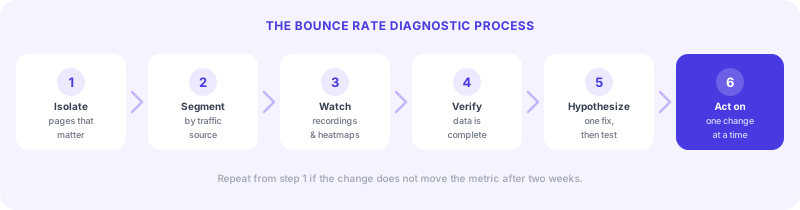
Step 1: Isolate the pages that actually matter
Pull your bounce rate data by individual page. Focus on pages where a bounce represents a missed opportunity: your homepage, product pages, pricing page, demo request page, and any high-traffic landing pages from paid campaigns. Blog articles can wait; a 75% bounce rate on a blog post is usually fine.
Sort by traffic volume × bounce rate. A page with 5,000 visits/month and a 70% bounce rate is a bigger problem than a page with 200 visits/month and a 90% bounce rate. Prioritize accordingly.
Step 2: Cross-segment by traffic source
Once you have a list of high-priority pages, break down bounce rate by channel for each one. The pattern you find points to a specific diagnosis:
| Pattern | Most likely cause |
|---|---|
| High bounce on paid, low on organic | Ad creative or targeting mismatch: the promise in the ad does not match the page |
| High bounce on organic, low on direct | Search intent mismatch: the content does not answer what the keyword implied |
| High bounce across all channels | The page itself is the problem (slow load, weak copy, no clear next step) |
| Sudden spike across all pages | Technical issue or broken analytics tag: check your tracking setup first |
| High on mobile, normal on desktop | Mobile experience failure (layout, speed, or usability) |
This matrix alone will eliminate half the possible causes before you open a single session recording.
Step 3: Watch what visitors actually do
Once you know which page and which source has the problem, the next layer is behavioral. Analytics tells you that visitors leave. Session recordings and heatmaps tell you what happened right before they left.
Watch 15 to 20 session recordings on your highest-bounce page, filtered to the traffic source identified in Step 2. You are looking for patterns:
- Rage clicks on elements that look clickable but are not, signaling broken expectations
- Dead scrolls where visitors stop scrolling at the same point, meaning the content loses them there
- Instant exits with no scroll at all, meaning the above-the-fold experience is failing immediately
- Form abandonment at a specific field, revealing friction at a precise step in the conversion flow
Tools like Hotjar and Sublim offer session recordings alongside traffic data. With an integrated platform you can filter recordings directly by traffic source, bounce status, or conversion outcome, without exporting data between tools.
Step 4: Check your data before acting on it
Two common reasons bounce rate data is unreliable, and you should verify both before making decisions:
Tracking misconfiguration
If your analytics tag fires multiple times on a single page load, every session looks like a bounce (one pageview per tag fire). Single-page applications that do not track route changes as separate pageviews will also show inflated bounce rates. Open your browser's developer tools and verify that your tag fires once per page, and that navigating between pages triggers a new event.
Consent-based data gaps
In EU markets with active consent banners, 30 to 50% of visitors typically decline tracking. Those visitors are completely absent from your Google Analytics bounce rate. The visitors who accept tracking skew toward brand-familiar or engaged users, which makes your bounce rate look artificially lower than it actually is.
If you are using a cookieless analytics tool that does not require consent (such as Sublim, Plausible, or Fathom), you are seeing 100% of your traffic and your bounce rate data reflects reality. If you are using Google Analytics with a consent banner, your data has a structural blind spot.
The 30-minute bounce rate audit
Here is a concrete process you can run on any high-priority page in under 30 minutes:
When a high bounce rate is not a problem
Not every high bounce rate warrants action. A contact page with a 15% bounce rate and a blog post with an 80% bounce rate can both be performing exactly as intended. The signal to pay attention to is a combination of three things: high bounce rate, on a page where engagement matters, from a traffic source where you are spending money or effort.
A blog post that ranks for a high-intent keyword but bounces 85% of readers is worth investigating. A blog post that educates readers who then leave satisfied and remember your brand? That is a different story, and the bounce rate alone does not tell it.