
What data sampling actually means
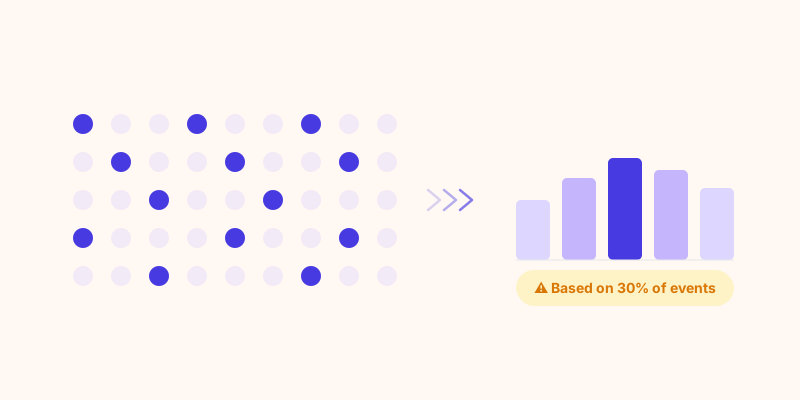
When GA4 cannot process all your data within its performance limits, it takes a subset of events and extrapolates. If your exploration report is based on 30% of your data, GA4 multiplies the results by roughly 3.3 to produce the numbers you see. The report looks complete. Nothing tells you it is an estimate unless you know where to look.
This is not a bug. It is a deliberate engineering tradeoff. Processing 100% of events for every custom query on every Google Analytics property simultaneously would be prohibitively expensive at Google's scale. Sampling is how Google Analytics stays free.
Sampling is one of the main mechanisms that distort data before it reaches your dashboard. Others include thresholding, behavioral modeling, and consent-driven data loss.
When sampling triggers in Google Analytics
Sampling does not affect all reports equally. Standard reports (Acquisition, Engagement, Monetization tabs) are unsampled by default. The problem is concentrated in Explore reports, which are the custom analyses most teams use for serious decision-making.
Google Analytics starts sampling exploration reports when a query exceeds 10 million events within the selected date range. That threshold is easier to reach than it sounds:
- A site with 5,000 daily visitors generating 10 events per session hits 50,000 events per day. A 6-month analysis crosses 9 million events.
- Adding a second dimension (like device + country) multiplies the cardinality and can trigger sampling even below the raw threshold.
- Applying segments or filters on top of an already large dataset almost guarantees sampling.
The indicator is a yellow shield icon in the top-right of the Explore interface. It shows the percentage of data actually used. A report labeled "60% data" means 40% of your events were not included in the calculation.
The thresholding problem: data that simply disappears
Sampling produces estimates. Thresholding produces silence.
Google Analytics applies a privacy threshold that removes rows from reports when a segment contains fewer than a certain number of users (typically around 50, though Google does not publish the exact figure). This protects individual privacy but creates gaps in your data that are easy to miss.
Practical examples of what disappears:
- Conversions from a specific city in a low-traffic country
- Behavior of users on a niche device type
- Traffic from a campaign that underperformed and sent only 30 visitors
- Any segment breakdown on a small site (under ~10,000 monthly sessions)
The row is not shown as zero. It is simply absent. If you do not know to look for it, you will not notice the gap.
Behavioral modeling: when Google Analytics fills missing data with AI predictions
Since iOS 14 and the decline of third-party cookies reduced observable data, Google introduced behavioral modeling in GA4. When real data is missing (because a user opted out of tracking, or declined a consent banner, or uses a privacy browser), GA4 uses machine learning to estimate what that user probably did.
This affects conversion counts, session attribution, and audience sizes. Google describes it as improving accuracy, but the consequence is that a portion of what you see in GA4 reports was never actually observed. It was predicted.
Google does not expose which rows in a report are modeled versus measured. There is no way to know, from inside the GA4 interface, how much of a given metric is real data and how much is an ML estimate.
Retrospective data changes: why last month's numbers are not fixed
Google Analytics can update historical data after the fact. Attribution models are recalculated as new sessions come in. Spam filter updates remove events retroactively. Model updates reweight historical predictions.
The result is that a report you ran in January and the same report you run in March can show different numbers for the same period. Teams that export data for monthly reporting and compare month-over-month sometimes discover the baseline has shifted.
This is not unique to GA4, but it is more pronounced because of the modeling layer. A tool that stores raw events does not have this problem: the event either happened or it did not.
What this means for decisions based on Google Analytics data
The practical consequences depend on how you use analytics:
How to check if a GA4 report is sampled
In Explore reports, look for the shield icon in the top-right corner. Green means unsampled. Yellow or red means the report is based on partial data, with the percentage shown on hover.
For standard reports, sampling is less common but thresholding still applies. If you see a row labeled "(other)" aggregating a large number of values, that is Google Analytics collapsing low-traffic rows to stay within reporting limits.
There is no equivalent indicator for behavioral modeling. You cannot tell from the interface whether a metric includes ML-estimated values.
GA4 360 and BigQuery: the workarounds
Google offers two partial solutions:
GA4 360 raises the sampling threshold significantly and provides unsampled report exports. It costs approximately 150,000 euros per year and is aimed at enterprise accounts.
BigQuery export (free for all GA4 properties) gives access to raw, unsampled event data that you can query with SQL. This solves the sampling problem but requires a data engineering setup, and thresholding still applies when you view results back in the GA4 interface.
Neither option is accessible to the typical marketing or product team running analysis directly in GA4.
A different approach: analytics built on raw data
Some analytics tools are architected to avoid this problem entirely. Sublim, for example, stores every event as a raw record in ClickHouse, a column-oriented database designed for analytical queries at high volume. Every report runs against 100% of the data, not a sample: standard traffic overviews and custom funnels by device and country alike. There is no ML layer filling gaps, no thresholding removing small segments, and no retrospective model updates changing historical numbers. What you see is what was measured.
This matters most for the analyses where GA4 sampling is most likely to kick in: long date ranges, multi-dimension breakdowns, and small audience segments. These are exactly the queries where accurate data makes the difference between a confident decision and a guess.
| Google Analytics 4 See comparison → |
Sublim Analytics Try for free → |
|
|---|---|---|
| Data sampling | Yes (Explore reports) | No |
| Privacy thresholding | Yes | No |
| Behavioral modeling | Yes (opaque) | No |
| Stable historical data | No | Yes |
| Raw event access | BigQuery only | All plans |
The bottom line
GA4 is not lying to you deliberately. It is making engineering tradeoffs that are reasonable at Google's scale but that have real consequences for the accuracy of what you see. Sampling introduces estimation error. Thresholding removes small but real segments. Behavioral modeling fills gaps with predictions. Retrospective changes mean your historical data is not frozen.
None of this makes Google Analytics useless. Standard reports on high-traffic properties are largely reliable. The problem is that the analyses that matter most, the ones where you slice by segment, channel, device, and time, are exactly the analyses most likely to be affected.
If you are making decisions on GA4 exploration reports without checking the sampling indicator, you may be optimizing based on estimates rather than measurements. The first step is knowing when to check.
If you are considering switching to a tool that avoids these issues by design, see our overview of the best Google Analytics alternatives in 2026.