This guide is written for the marketing manager who feels slightly lost every time they open an analytics dashboard. For the business owner who knows they should be tracking things but is not sure what to track. For the product lead whose developer installed an analytics tool months ago, but who has never quite figured out what to do with the numbers.
You do not need to be a data analyst to make good decisions from web analytics. You need a clear mental model, a small set of metrics that actually tell you something useful, and a repeatable process for reading them. This guide covers all three.
By the end, you will know which numbers to look at first, what they mean in plain terms, how to diagnose the problems hiding in your data, and how to turn what you see into decisions your team can act on the same week.
Chapter 1: What web analytics actually measures
Before reading any dashboard, it helps to understand what is being counted and how. Most people open analytics and see a number (4,287 visitors last month) without understanding what that number represents or why it might be wrong.
The basic model
When someone visits your website, their browser sends a request to your web server. The page loads. Your analytics tool records that a visitor arrived, which page they landed on, where they came from (the URL they clicked or the search they did), and what device and browser they used.
From that point on, the analytics tool tracks what happens: does the visitor click something, navigate to another page, fill out a form, or leave without doing anything? All of this gets recorded as a series of events associated with that visitor's session.
The three levels of data
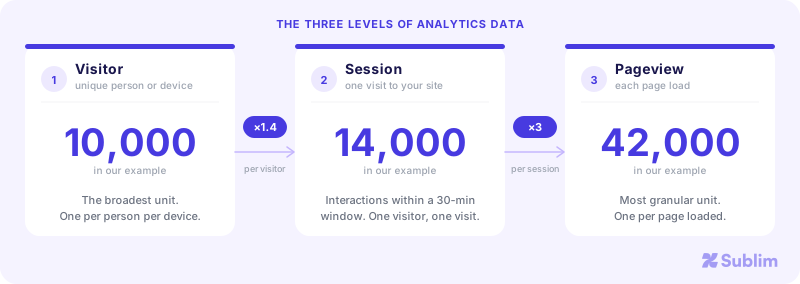
The relationship is: many pageviews per session, many sessions per visitor. When a dashboard says "10,000 visitors, 14,000 sessions, 42,000 pageviews," it means 10,000 distinct people visited, they came on average 1.4 times each, and they viewed 4.2 pages per visit on average.
Why the numbers might be wrong
Two important things to know before trusting any analytics number:
Cookie-based tools miss opted-out visitors. Tools like Google Analytics place a cookie on the visitor's browser to identify them across sessions. In European markets, 30 to 50% of visitors decline or ignore cookie consent banners. Those visitors are completely invisible in your reports. The data you see represents only the people who accepted tracking, which skews toward engaged, brand-familiar users. Your actual traffic is higher than what GA4 reports.
Cookieless tools see everyone. Tools that do not place cookies (such as Sublim, Plausible, or Fathom) measure all visitors, regardless of consent preferences, by processing signals available without storing anything on the visitor's device. Their numbers are more complete. For more on this distinction, see our article on running analytics without a consent banner.
Chapter 2: The six metrics that actually matter
Most dashboards show 20 to 30 metrics. Most of those metrics are noise. These six are the ones that tell you something actionable about your site.
1. Visitors (users)
The number of distinct people who came to your site in a given period. This is your reach. It tells you how big your audience is, and whether it is growing or shrinking.
What to watch for: month-over-month trend. A 10% decline two months in a row is worth investigating. A sudden spike is also worth investigating (did something go viral, or did a bot crawl your site?). The absolute number matters less than the trend and the source breakdown.
2. Sessions
The number of visits, not visitors. A site with 1,000 visitors generating 2,000 sessions has an average of 2 return visits per person, which is a good sign for engagement. A site with 1,000 visitors and 1,010 sessions is barely getting anyone to come back.
For most sites, a healthy sessions-to-visitors ratio is between 1.2 and 1.8. Higher than 2.5 often means you have a small but very engaged audience (common for SaaS products or membership sites). Lower than 1.1 suggests almost no one returns.
3. Bounce rate
The percentage of sessions where the visitor viewed only one page and left without interacting. A visitor arrives, reads nothing (or reads everything), and leaves. That is a bounce.
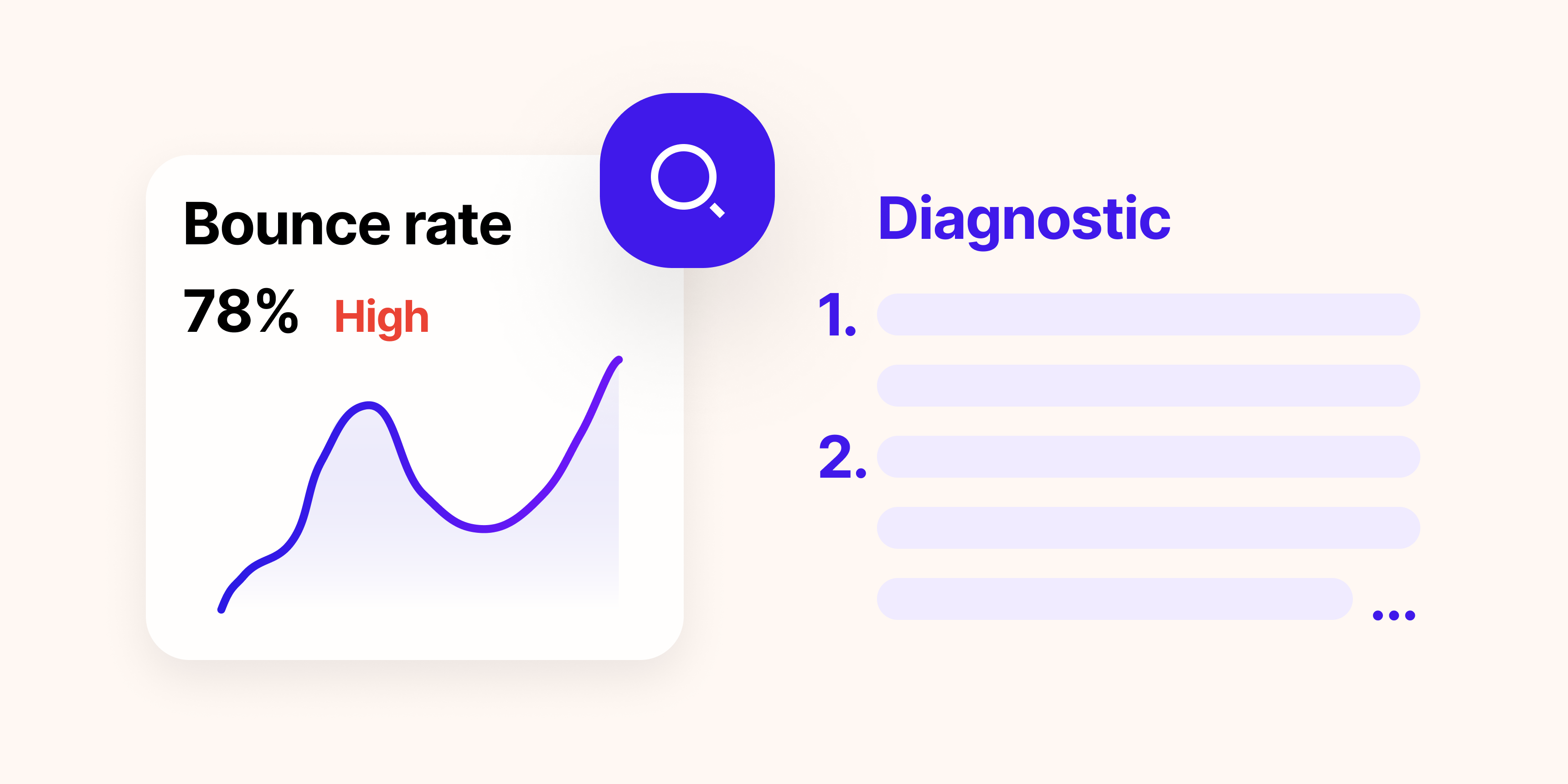
Bounce rate is widely misread. A 70% bounce rate on a blog post is usually fine. The visitor read the article and left satisfied. A 70% bounce rate on a pricing page is a problem. Context is everything. Our diagnostic guide on bounce rate covers how to interpret this metric by page type and traffic source.
4. Traffic sources
Where your visitors come from: organic search, direct, paid ads, social media, email, or referral links from other sites. This is one of the most important dimensions in your data because it tells you which acquisition channels are working.
A site that gets 80% of its traffic from one source is fragile. If that source disappears (a Google algorithm update hits your SEO, or your ad budget runs out), traffic collapses. Healthy sites have traffic distributed across at least three channels. We cover sources in detail in Chapter 4.
5. Conversion rate
The percentage of visitors who complete a goal: a form submission, a sign-up, a purchase, a phone call, a download. This is the metric that connects traffic to business outcomes.
Industry averages for conversion rates vary enormously by type: e-commerce sites average 1 to 3% purchase rate; SaaS free trial sign-ups typically run 2 to 5%; lead generation forms average 1 to 5% depending on the offer. Your benchmark is your own historical performance, not industry averages.
6. Top pages
Which pages get the most traffic and which pages generate the most conversions. These are not always the same pages. Your most visited page might be a blog post that drives zero conversions, while a low-traffic but high-intent page (like a pricing comparison) drives most of your leads.
Looking at top pages by both traffic and conversion gives you a two-dimensional picture: where people land, and where the business actually happens.
Chapter 3: Reading your dashboard
Most people open their analytics dashboard, stare at the numbers, and close it without having learned anything actionable. The problem is not the data: it is the absence of a process for reading it.
Here is a five-minute weekly routine that consistently surfaces the things worth knowing.
Step 1: Compare this week to last week
Open your dashboard and set the date range to the current week compared to the same period last week. You are looking for anomalies: traffic drops or spikes of more than 15%, conversion rate changes of more than 2 percentage points, unusual source patterns.
If everything looks flat (within 5% of last week), you are done in 30 seconds. If something changed, move to step 2.
Step 2: Identify whether the change is source-specific or site-wide
Break your traffic down by source. If organic traffic dropped 30% but paid traffic stayed flat, this is an SEO issue, not a site issue. If all sources dropped simultaneously, something on the site changed (a technical issue, a page going offline, an analytics tracking problem).
This one segmentation eliminates half of all possible explanations immediately.
Step 3: Check your conversion pages
Look at the conversion rate on your key pages (pricing, sign-up, contact). Did it change? If visits to those pages stayed the same but conversions dropped, something on the page broke the flow. If visits dropped, the traffic problem is upstream.
Step 4: Apply the "so what?" test
For any number you are looking at, ask: so what? If the answer is "I should do X," write it down. If the answer is "interesting but I don't know what to do about it," skip it and move on. The purpose of analytics is to generate decisions, not observations.
Chapter 4: Understanding where your traffic comes from
Traffic source is one of the most important dimensions in analytics, and one of the most misunderstood. Here is what each channel means in plain terms.
| Channel | What it means | Visitor intent |
|---|---|---|
| Organic search | Clicked a result on Google, Bing, or another search engine without paying for the placement | High: they searched for something specific |
| Direct | Typed your URL directly, used a bookmark, or came from a source analytics could not identify (some email clients, PDF links) | Very high: they already know you |
| Paid search | Clicked a search ad on Google or Bing | High: they searched; medium intent depends on keyword match |
| Social | Clicked a link from a social media platform (LinkedIn, Facebook, Twitter/X, Instagram) | Low to medium: they were browsing, not searching |
| Clicked a link from an email campaign | High: they opened an email and clicked through | |
| Referral | Clicked a link on another website (a blog mention, a partner site, a directory) | Variable: depends on the referring site's context |
Why intent matters more than volume
A visitor from organic search who typed "web analytics tool" is more likely to convert than a visitor who clicked a social post casually scrolling their feed. The same number of visitors from two different sources can produce dramatically different conversion rates.
When you look at your traffic sources, do not just compare volumes. Compare conversion rates by source. If organic search converts at 3% and social converts at 0.4%, putting effort into SEO has 7x the return of doubling your social posting frequency.
UTM parameters: the tool that makes attribution accurate
UTM parameters are tags you add to the end of a URL in your emails, ads, and social posts. They tell your analytics tool exactly where a click came from, including the specific campaign, medium, and content.
A URL without UTM parameters: https://yoursite.com/pricing
A URL with UTM parameters: https://yoursite.com/pricing?utm_source=newsletter&utm_medium=email&utm_campaign=june-promo
When someone clicks the second URL, analytics records that this visit came from your June newsletter, via email. Without UTM parameters, email traffic often shows up as "direct," which makes it invisible in your channel breakdown.
Three parameters are the minimum worth using: utm_source (where: newsletter, linkedin, google), utm_medium (how: email, cpc, social), and utm_campaign (which campaign: june-promo, product-launch).
Chapter 5: What your visitors actually do on your site
Traffic numbers tell you people arrived. Behavioral data tells you what happened next.
Top pages: separating traffic from value
Your top pages by traffic are not necessarily your most important pages. Sort your pages by two different metrics side by side:
- By sessions: this shows where people land and what they read most
- By conversions: this shows which pages actually drive business outcomes
Pages that appear high in both lists are your most valuable pages: protect them, do not change them without testing, and make sure they are loading fast. Pages with high traffic but low conversions are the optimization opportunity.
Scroll depth: do they actually read it?
Scroll depth tells you what percentage of a page visitors reach before leaving. If 80% of visitors never scroll past the first screen of your homepage, everything below the fold is invisible to them. Your CTA at the bottom of the page is not being seen.
Common patterns to watch for:
- A sharp drop-off at 25% usually means the above-the-fold content failed to create enough interest to scroll
- High engagement to 75% but no conversions means the CTA or offer at the bottom is failing, not the content
- Uniform distribution (everyone scrolls all the way) usually means a short, dense page: check if there is a natural stopping point for a CTA
Session recordings: seeing what analytics cannot tell you
Analytics tells you that visitors leave. Session recordings tell you what they did right before leaving. You can watch a real visitor's mouse movements, clicks, scrolls, and form interactions, all anonymized, without seeing any personal data.
This is where the most actionable insights come from. A heatmap showing zero clicks on your CTA button is more convincing than a conversion rate of 0.2%. A recording showing five visitors in a row abandoning the same form field is a direct instruction to fix that field.
For a practical framework on how to use session recordings effectively, see our article on filtering session replays by traffic source. The core idea: a random recording tells you very little; a recording filtered by source, device, and conversion outcome tells you exactly where the problem is.
Chapter 6: Goals and conversions
Traffic without conversion tracking is incomplete. You know people are visiting; you do not know if any of them are doing anything useful.
Defining what counts as a conversion for your site
A conversion is any action that represents value to your business. The definition varies by site type:
| Site type | Primary conversion | Secondary conversions |
|---|---|---|
| SaaS | Free trial or paid sign-up | Demo request, pricing page visit, documentation read |
| E-commerce | Purchase completed | Add to cart, newsletter sign-up, product page view |
| Lead generation | Form submission or call | Content download, email sign-up, specific page visit |
| Publisher / blog | Newsletter subscription | Article read to completion, return visit |
| Services / agency | Contact form or consultation booking | Portfolio view, case study read, pricing page view |
Macro and micro conversions
A macro conversion is the primary goal: the sign-up, the purchase, the form submission. A micro conversion is a smaller action that indicates progress toward that goal: reading three blog posts, visiting the pricing page twice, clicking the demo button even if not completing the form.
Tracking micro conversions helps you understand the path to purchase. If 40% of your eventual customers visit the pricing page three times before converting, that is a signal. You can use that insight to design your site and emails to encourage that behavior in visitors who have only been once.
Setting up goal tracking without being technical
Most modern analytics tools let you define goals based on:
- URL visit: the visitor reached your thank-you page after form submission (the simplest goal type, requires no code)
- Button click: the visitor clicked a specific button (requires a small amount of setup but no developer for most tools)
- Time on site: the visitor stayed for more than X minutes (a rough proxy for engagement)
- Scroll depth: the visitor scrolled 75% or more of a specific page
Start with the URL-based goal for your primary conversion (the thank-you page after sign-up or form submission). It takes five minutes and immediately gives you a conversion rate to track.
Chapter 7: Turning data into decisions
The most common failure in analytics is not collecting the wrong data: it is collecting the right data and then not doing anything with it. Data becomes useful only when it changes a decision.
Three questions to ask every week
If none of these questions surfaces anything unusual, you are done. Do not manufacture insights from flat data.
How to diagnose a traffic drop
Traffic dropped. Here is the diagnostic process that identifies the cause in under 15 minutes:
How to know if a change actually worked
You rewrote your homepage headline. How do you know if it helped?
The disciplined approach: measure conversion rate on that page for two weeks before the change, then two weeks after. Compare. If the rate went from 2.1% to 2.8%, that is a meaningful improvement. If it went from 2.1% to 2.2%, that may be noise.
Two caveats: one, wait for enough traffic before concluding (at least 100 to 200 sessions on the changed page). Two, change one thing at a time. If you changed the headline, the image, and the CTA simultaneously, you cannot attribute the change in conversion rate to any single element.
When not to act on data
Not every data point warrants action. Three situations where the right response is to wait:
- Small sample sizes. A page with 40 visits and a 0% conversion rate does not mean the page does not convert: it means you do not have enough data to know yet.
- Seasonal patterns. August traffic dropping 15% may reflect normal summer slowdown, not a problem. Compare to the same period last year before concluding anything.
- One-time anomalies. A spike in traffic on one day that returns to normal the next is usually a referral from a popular newsletter or a viral moment. Do not build strategy around a single data point.
Chapter 8: GDPR and data accuracy
If you operate in the EU or target European users, GDPR affects your analytics. But the implications are different from what most people think.
The consent banner question
Whether you need a consent banner for analytics depends entirely on which tool you use, not on the fact that you are tracking analytics at all.
Analytics tools that place a cookie on the visitor's browser require consent under the EU's ePrivacy Directive before that cookie can be set. Google Analytics sets cookies. Therefore, Google Analytics requires a consent banner in the EU.
Analytics tools that do not place cookies (those that process server-side signals like IP address, immediately anonymized, user agent, and referrer) do not trigger the cookie consent requirement. No cookie is set on the visitor's device, so Article 5(3) of the ePrivacy Directive simply does not apply.
This is a technical distinction, not a loophole. Our full explanation of the legal framework covers the CNIL criteria in detail.
What this means for your data quality
If you use a cookie-based tool with a consent banner, your analytics data has a structural blind spot. In EU markets, 30 to 50% of visitors decline or ignore consent banners. Those visitors are invisible in your reports. The segment you are missing is not random: visitors who decline consent tend to skew toward privacy-conscious users, mobile users, and first-time visitors. Your analytics is showing you a self-selected sample, not your actual audience.
If you use a cookieless tool, you see 100% of your traffic. Every visitor is counted, including the ones who would have declined a consent banner. Your data reflects reality.
GDPR compliance in practice
Even without a consent banner, you have obligations. Your privacy policy should describe what data is collected (page path, referrer, country, device type), the legal basis for processing (legitimate interest for audience measurement), the data retention period, and how users can opt out. Most cookieless analytics providers publish documentation you can reference directly. The compliance surface is real, but it is a privacy policy update, not a consent management platform.
Chapter 9: Your 30-day action plan
Reading about analytics is useful. Doing something with it is where the value comes from. Here is a concrete 30-day plan to go from having analytics installed to making your first data-driven decision.
- Confirm your analytics script is installed on every page (check in real-time view)
- Set up your first goal: the URL your users reach after completing your primary action (sign-up confirmation, contact thank-you)
- Make sure UTM parameters are on all your email, ad, and social links
- Note your baseline: current monthly visitors, sessions, and conversion rate
- Review your top 5 traffic sources and their conversion rates
- Identify your top 3 landing pages by traffic and your top 3 by conversions
- Note any source with a conversion rate more than 2x higher than your average: that channel deserves more investment
- Check scroll depth on your homepage and your main landing page
- Watch 10 session recordings on your highest-traffic page, noting where visitors stop and what they click
- Write down one specific thing that surprised you: something visitors do that you did not expect
- Based on what you found in weeks 2 and 3, identify one specific change to make: a headline to rewrite, a CTA to move, a form field to remove
- Make the change and note the date
- Set a reminder to check the conversion rate on that page in two weeks
- That is it. One hypothesis, one change, one measurement. That is the full cycle.
The bottom line
Web analytics is not complicated. It is made to seem complicated by tools that surface 30 metrics at once and by the pressure to appear data-driven without doing the work of actually understanding what the data says.
The foundation is simple: know where your visitors come from, know what they do when they arrive, and know which actions lead to outcomes that matter to your business. Everything else is detail.
Start with the six metrics in Chapter 2. Run the five-minute weekly review from Chapter 3. Set up one goal. Watch ten session recordings. Make one change. Measure it.
That cycle (observe, hypothesize, change, measure) is the entire practice of working with analytics. The tools get more sophisticated, but the loop stays the same.
If you are evaluating which analytics tool to use, see our comparison of the best Google Analytics alternatives in 2026. If you are specifically concerned about data accuracy and GDPR, the article on running analytics without a consent banner covers what you need to know.