Most teams watch session recordings the same way: open the tool, filter by the page with the highest bounce rate, and click play on whatever comes up. After 20 recordings, they make a change. Sometimes it works. Usually it does not.
The problem is not the recordings. It is the sample. A random recording of a visitor on your pricing page tells you what one person did. It does not tell you whether that behavior is typical, what brought them there, or why they left without converting. Without that context, you are pattern-matching on noise.
The teams that consistently find real problems in session recordings do one thing differently before they press play: they filter by traffic source, device type, and conversion outcome. That combination turns an anecdotal observation into evidence.
Why traffic source changes everything you see
A visitor who arrived at your landing page from a Google Ads campaign saw a specific promise in the ad ("GDPR-compliant analytics, no setup required") and clicked expecting exactly that. If the page opens on a generic product overview instead of confirming that promise immediately, they leave within seconds.
A visitor who arrived at the same page from an organic search for "best analytics alternatives" found you through content, has read about the problem space, and is in a slower evaluation mode. They will scroll further, read more, and leave for different reasons than the paid visitor.
If you mix recordings from both sources and watch them together, you will see a confused signal. The rage clicks from the paid visitor frustrated by a mismatch between ad promise and page content will average out against the slower, more exploratory behavior of the organic visitor. You will draw conclusions that do not apply to either.
Segment first. Watch second.
The three dimensions that define a useful segment
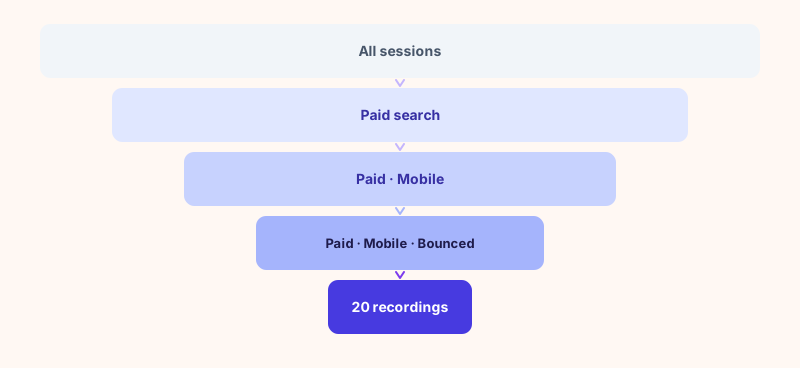
Before opening a single recording, define the combination you want to investigate. Three dimensions are enough:
- Traffic source: paid search, organic, direct, email, or social. Each visitor arrives with different expectations and intent, so the same page performs differently depending on where they came from.
- Device type: mobile and desktop are effectively different products. A problem that only shows up on mobile calls for a different fix than one that appears everywhere.
- Conversion outcome: bounced, converted, or abandoned mid-funnel. This is what separates the sessions worth diagnosing from the ones that already worked as intended.
A segment defined by all three is specific enough to be actionable. "Paid search, mobile, bounced" is a problem statement. "All visitors to my pricing page" is not.
What each combination tells you before you watch a single recording
Not every combination points to the same type of problem. Reading the signal in advance focuses your attention and prevents you from retrofitting an explanation after the fact.
| Source | Device | Outcome | Most likely problem |
|---|---|---|---|
| Paid | Any | Bounced | Ad-to-page mismatch: the promise in the ad does not match what the page delivers above the fold |
| Organic | Any | Bounced | Search intent mismatch: the content does not answer what the keyword implied |
| Any | Mobile | Bounced | Mobile experience failure: layout, load speed, or a CTA that is not tappable |
| Any | Any | Abandoned mid-funnel | Friction at a specific step: a form field, a missing payment option, or an absent trust signal |
| Direct | Any | Bounced | Return visitor expectation mismatch: something changed that broke a familiar flow |
| Any | Bounced | Audience-page misalignment: the landing page does not match the email segment or the offer |
This diagnosis happens before you open a recording, not after. You are not looking for a surprise. You are looking for confirmation of a specific hypothesis.
The 20-recording protocol
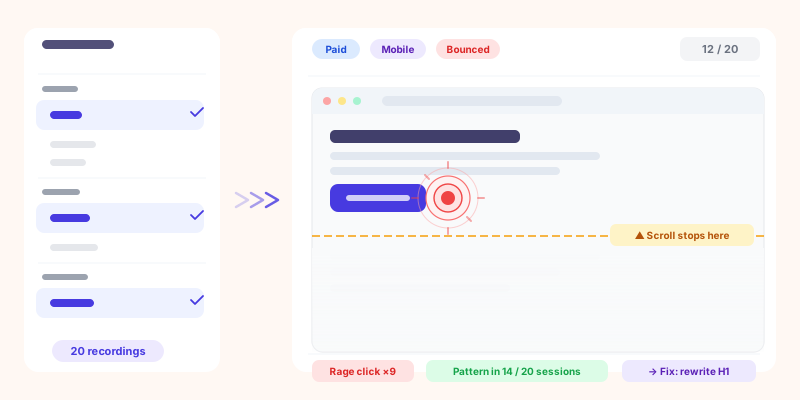
Once you have your segment and your hypothesis, watch 20 recordings. Not 5 (too few to find a pattern). Not 50 (a full afternoon for diminishing returns). Twenty is enough.
What to look for, in order of diagnostic weight:
Track what you observe across all 20 recordings with a simple tally. You are looking for patterns that appear in at least 30 to 40 percent of sessions in your segment. A pattern in 2 out of 20 recordings is noise. A pattern in 10 out of 20 is a finding.
A concrete example: a paid campaign landing page at 1.8% conversion rate
Your paid search campaign sends traffic to a specific landing page. The conversion rate is 1.8%. Industry benchmark for similar pages sits around 3 to 4%. Something is underperforming, but the GA4 report just shows a high bounce rate and low session duration. It does not tell you why.
Without the filtering framework, you watch 20 random recordings on that page. You see a mix: some visitors scroll slowly, some exit quickly, some seem engaged but never click the CTA. You cannot tell whether the quick exits are from paid traffic or organic visitors who landed on the same URL. You cannot tell whether the engaged-but-not-converting sessions represent a different problem than the instant exits. You make a guess and change the headline.
With the filtering framework, you run three separate investigations:
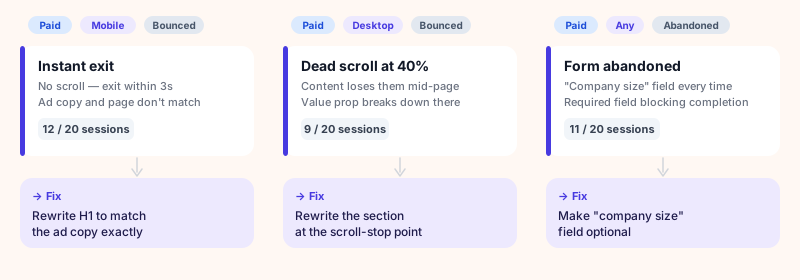
Three segments, three different diagnoses, three different fixes. The aggregate bounce rate report showed you that something was wrong. The filtered recordings told you exactly what to change and where.
Why this is nearly impossible with disconnected tools
The filtering described above requires two pieces of information simultaneously: what the analytics tool knows (traffic source, device, conversion outcome) and what the behavioral tool knows (the recording itself).
Most teams use Google Analytics for traffic data and a separate tool (Hotjar, Microsoft Clarity, or similar) for recordings. The data does not flow between them. When you open Hotjar, you see sessions. You can filter by page, by device, sometimes by duration. But you cannot filter by the UTM campaign that brought the visitor there, or by whether they completed a goal configured in GA4.
The workaround is manual: export session IDs from GA4, cross-reference with Hotjar, find the matching recordings. In practice, almost no team does this. They watch recordings without context, draw weak conclusions, and wonder why the changes they make do not move conversion rate.
| Capability | GA4 + Hotjar (separate tools) See Sublim vs Hotjar → |
Sublim (integrated) Try for free → |
|---|---|---|
| Filter recordings by traffic source | Manual cross-reference only | Native filter |
| Filter recordings by conversion outcome | Not possible directly | Native filter |
| Filter recordings by device + source combined | Device in Hotjar, source in GA4: no link | All three combined in one view |
| Traffic source visible in the recording view | No | Yes |
| GDPR: no consent banner needed | No (both tools require consent in EU) | Yes |
There is a compounding GDPR problem worth noting. In EU markets with an active consent banner, 30 to 50% of visitors decline tracking. Hotjar does not record sessions from visitors who declined. Your recordings are already a self-selected sample of the visitors who accepted, skewing toward engaged, brand-familiar users. The visitors most likely to bounce fast are also the most likely to have declined consent and be invisible in your recording tool. For more on this, see our article on running analytics without a consent banner.
The one hypothesis rule
At the end of the 20-recording protocol, you should have one hypothesis. Not five. Not a list of things to improve. One statement in this form: "If I change X, the conversion rate for [source, device, outcome] segment will improve because [pattern] appeared in [N] out of 20 recordings."
This constraint matters. Teams that emerge from a recording session with a list of ten things to fix tend to implement all of them at once, then measure the outcome without knowing which change drove the result, or which one caused a regression elsewhere. One hypothesis, one change, two weeks of measurement.
If your recordings reveal strong patterns across multiple segments, prioritize by traffic volume multiplied by conversion gap. A problem affecting your highest-spend paid campaign takes precedence over a form abandonment pattern in a small direct traffic cohort.
The bottom line
Session recordings are evidence. Like all evidence, their value depends on how you collect them. A random sample of recordings from a high-bounce page is anecdotal. A sample filtered by source, device, and conversion outcome is a controlled observation.
The process that works: define your segment before you open a recording → form a hypothesis about what you expect to see → watch 20 recordings and tally the patterns → identify one finding that appears in at least 30% of sessions → make one change → measure for two weeks.
The process that does not work: open a tool, click play, notice interesting things, change several things, wonder why conversion rate did not move.
The filtering is the work. The watching is just confirmation.
For the traffic-side diagnostic that complements this workflow, see our bounce rate diagnostic guide. The segmentation logic is the same: isolate the source, then interpret the signal.