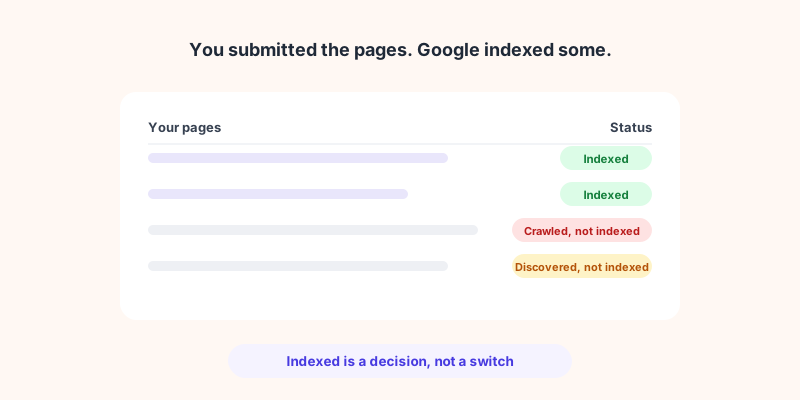
You publish a page, wait a week, and it still is not showing up in Google. Search Console says it is "Discovered" or "Crawled", but not indexed. You are not being penalized, and nothing is technically broken. The page simply did not clear the bar to enter Google's index.
This is one of the most common and most misunderstood SEO problems, because getting into Google is not one step but two: your page has to be crawled, and then Google has to decide it is worth indexing. This guide explains the difference, shows you how to read what Search Console is actually telling you, walks through the real reasons pages do not get indexed, and clears up the crawl-budget myth that wastes so much time.
Crawling and indexing are two different steps
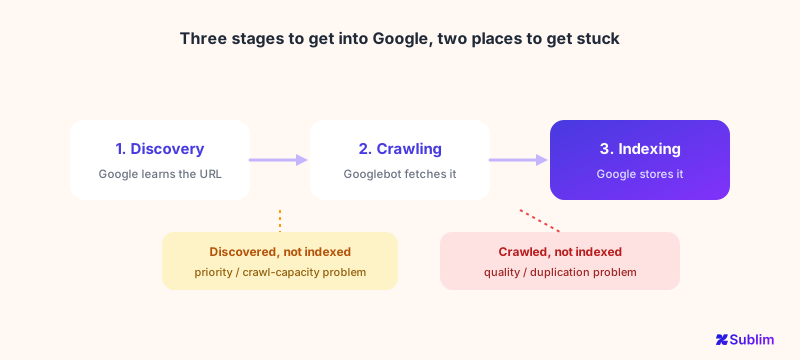
People say "Google didn't crawl my page" when they mean "Google didn't index it", but these are separate stages, and knowing which one failed tells you what to fix.
A page can be stuck at any of these stages, and the fix is completely different each time. A page waiting to be crawled has a discovery or priority problem. A page that was crawled but not indexed has a quality or duplication problem. Confusing the two is why so many "fixes" do nothing.
What Search Console is actually telling you
Google's Page indexing report gives every excluded page a specific status. Most people never read past the count. Here are the ones you will actually see, and what each really means:
| Status | What it really means |
|---|---|
| Discovered – currently not indexed | Google knows the URL but has not crawled it yet. Often a priority or crawl-capacity signal. |
| Crawled – currently not indexed | Google read the page and chose not to index it. Usually a content quality signal. |
| Duplicate without user-selected canonical | Google sees the page as a near-duplicate and indexed another version instead. |
| Duplicate, Google chose different canonical than user | You set a canonical, Google overrode it and picked another page. |
| Excluded by 'noindex' tag | The page tells Google not to index it. Often accidental. |
| Blocked by robots.txt | Googlebot was not even allowed to crawl it. |
| Soft 404 | The page looks empty or error-like to Google, even if it returns 200. |
The status is the diagnosis. "Crawled - not indexed" and "Discovered - not indexed" point at completely different problems, so always start here before touching anything.
Why your pages are not getting indexed
Strip away the labels and almost every case comes down to a handful of causes:
- Thin or low-value content. The most common reason behind "Crawled - currently not indexed". Google crawled the page, judged it not worth storing, and moved on. Pages that restate what dozens of other pages already say are the usual victims.
- Duplication and canonical confusion. Near-identical pages (product variants, filtered URLs, boilerplate) make Google pick one and drop the rest. Conflicting or missing canonical tags make this worse.
- Accidental noindex or robots.txt blocks. A stray
noindexfrom a template or a blanketrobots.txtrule can silently keep whole sections out. Always worth checking first because it is a one-line fix. - Weak internal linking (orphan pages). If nothing on your site links to a page, Google may never prioritize crawling it. Discovery and crawl priority depend heavily on internal links.
- Soft 404s and technical errors. Empty pages, broken templates, or error-like responses tell Google there is nothing worth indexing.
Is crawl budget your problem? (Almost certainly not)
Whenever indexing comes up, someone blames "crawl budget". For the vast majority of sites, that is a red herring. Google's own guidance on managing crawl budget is blunt: it is written for large sites (1 million+ pages), or medium sites (10,000+ pages) with very rapidly changing content. Google states plainly that if your pages are usually crawled the same day they are published, you do not need to read that guide at all.
So if you run a normal business site, blog, or store with a few hundred or few thousand pages, crawl budget is not why your pages are missing. The real cause is almost always quality or duplication, not crawl capacity. Chasing crawl budget on a small site is time you should spend on the actual problem.
How to fix it, step by step
- Start in the Page indexing report. Group the not-indexed pages by status. The status tells you which problem you have before you change anything.
- Rule out the accidental blocks first. Check for stray
noindextags androbots.txtrules. These are quick wins that can free entire sections. - Fix duplication. Set clear canonical tags, consolidate near-identical pages, and make each surviving page genuinely distinct.
- Raise thin content or remove it. For "Crawled - not indexed", either make the page substantially more useful than the competition, or prune it so it stops diluting your site.
- Strengthen internal links. Link to important pages from relevant, already-indexed pages so Google discovers and prioritizes them.
- Submit a clean sitemap and use "Request indexing" for genuinely valuable pages, then be patient. Indexing is a decision, not a switch.
How Sublim helps
Sublim gives you both halves of the picture in one place. Its built-in crawler surfaces the technical problems that keep pages out of the index: broken links, duplicate titles, meta descriptions and content, missing metadata, and slow pages, all scored so you can prioritize.
And its Search Console integration shows your indexation status directly, submitted versus indexed pages, with the errors and warnings Google reports.
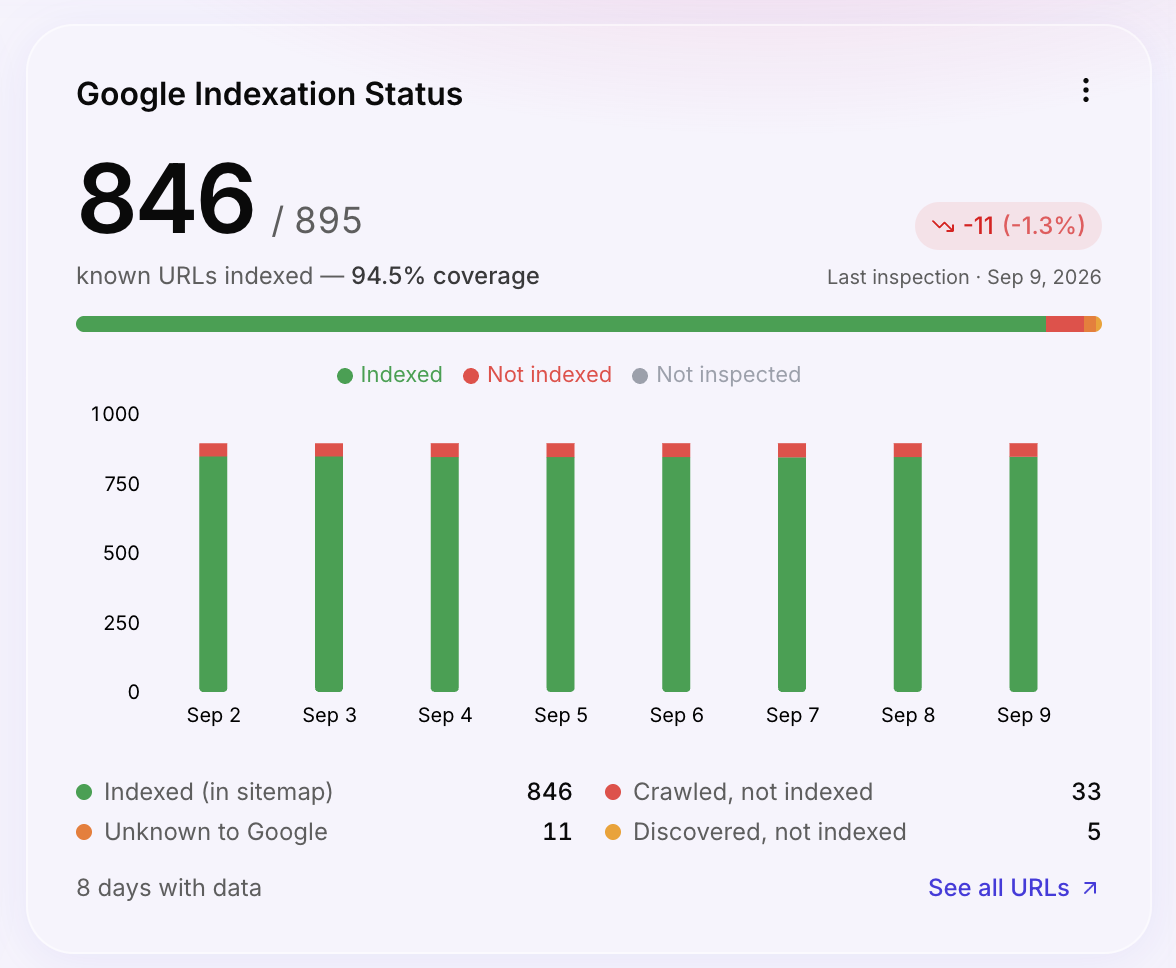
Because Sublim is also your analytics, it does something a standalone SEO tool cannot: it cross-references indexed pages against real organic traffic, so you can spot pages that are indexed but get no visits, the low-value content that is often dragging the rest down. It will not force Google to index a page (nothing can), but it makes the diagnosis fast and concrete instead of guesswork.