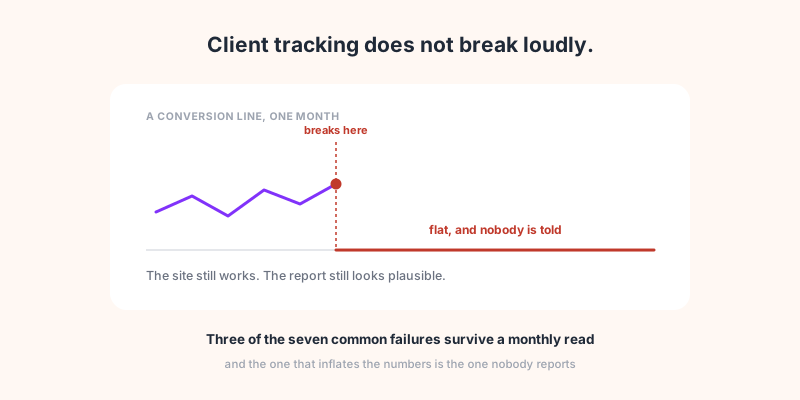
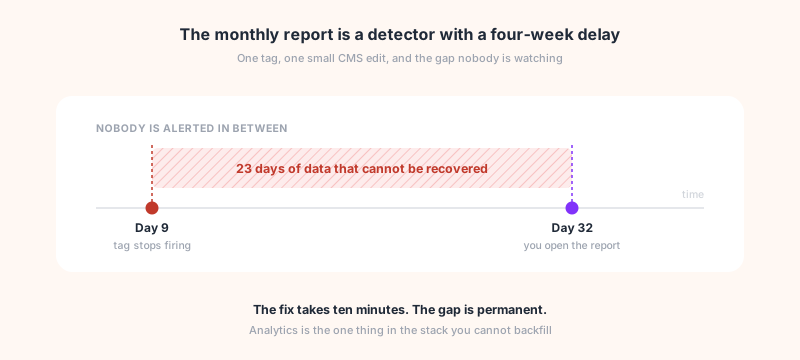
You open a client's report on the 2nd of the month. The conversion line is flat, and it has been flat since the 9th of the month before. Three weeks of data on an account you are paid to watch, and the first person to notice is you, with the report already half written.
The break itself is ordinary. A theme update, a CMS edit, a renamed form field. That is all it takes for the tag to stop firing, the piece of script sitting in your pages that reports every visit to your analytics tool. What makes it expensive is the gap between the day it broke and the day you found out, because analytics is the one thing in your stack you cannot backfill. This article is about closing that gap: the ways client tracking breaks, why the portfolio hides it, and what alerting has to get right before it is worth switching on.
The break is cheap. The delay is not.
Most things that break in a client's stack announce themselves. The site goes down and someone phones. A form stops sending and the client notices the silence. A card payment fails and the money does not arrive.
Tracking is different, because nothing downstream depends on it. The site keeps serving pages, the forms keep working, the client keeps selling. The only symptom is a number that is lower than it should be, in a tool only you look at, and only once a month.
That is also why the loss is permanent. A broken deploy can be rolled back. A lost invoice can be reissued. Visits that were not recorded are simply gone, and no amount of fixing the tag afterwards recovers them. Fix it on day 23 and you still owe the client an explanation for days 9 to 23, which is a worse conversation than the fix.
Seven ways client tracking breaks
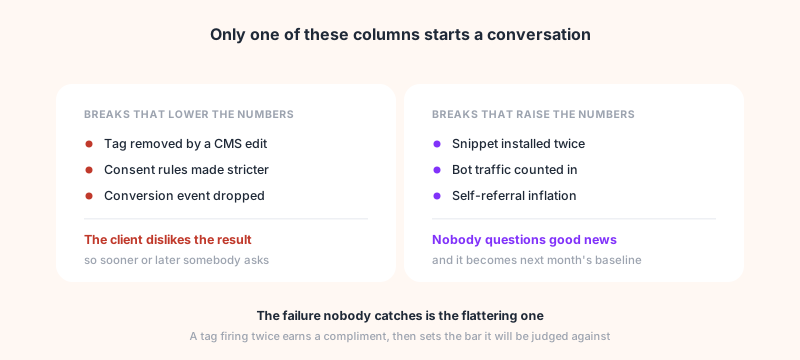
These are the failures that produce a plausible-looking report rather than an obvious error. Each one has a different symptom, and that matters, because the ones that reduce your numbers get questioned eventually and the ones that raise them never do.
| What happened | What the report shows | Caught by the monthly read? |
|---|---|---|
| Tag removed by a CMS or theme edit | Everything stops on one date | Eventually, because zero is visible |
| Tag installed twice | Pageviews and sessions inflated | No. Nobody audits good news |
| Tag manager loads, your tag does not fire | No data at all, exactly like a removed tag | The zero shows. The cause does not: GTM is there |
| Consent banner reconfigured | A step down, often 20 to 40% | Mistaken for a bad month as often as not |
| A conversion event renamed or dropped | Traffic fine, conversions at zero | Only if someone reads past the traffic chart |
| Redirect or UTM loss | Right totals, wrong channels | No. The number you check is correct |
| Checkout on another domain | Sessions split, revenue unattributed | No. It looks like weak campaign performance |
Three of the seven do not show up in a monthly read at all. The uncomfortable one is the single row that raises the numbers rather than lowering them: a tag firing twice produces no complaint, it produces a compliment, and then it sets the baseline that next month gets measured against. Every other failure in the table at least has the decency to look like bad news. The tag manager case is its own thing: the zero is visible, but the reflex check comes back clean, so the cause gets hunted everywhere except where it is.
Two of these have enough going on to deserve their own treatment. Attribution landing in direct or unassigned is a diagnosis in itself, which the traffic drop guide works through. And the consent banner case is less about the banner than about what you measure after it, which the consent article covers.
Why the portfolio hides it
With one site you would notice. You look at it often, you know what a Tuesday looks like, and a flat line stands out.
The arithmetic changes with the roster. Assume one tracking incident per client per year, which is conservative for a site with an active CMS and several people allowed to deploy. At 30 clients that is an incident somewhere in your portfolio every fortnight, spread across accounts you look at once a month each. The incidents are not rarer than before, they are just distributed thinly enough that no single account feels broken.
It gets worse with the accounts that matter least. The small retainer you check briefly is exactly where a break survives longest, and it is also the client most likely to read the one number that moved and ask about it in the renewal conversation.
Why most tracking alerts get switched off
Everyone who has run alerting at scale has turned it off again. The reason is almost always the same: the alert compared yesterday with the day before.
Do that and you alert every Monday on a B2B site, every weekend on a B2C one, and every public holiday on all of them. After three weeks nobody reads the emails, which is worse than having no alerting at all, because now you believe you are covered.
Alerting that survives contact with a real portfolio has to get four things right, and they are all about not crying wolf:
Compare like with like. The baseline has to be the same weekday over several weeks, not the previous day. Monday is not a quiet Sunday.
Have a volume floor. On a site doing 12 sessions a day, a drop to 5 is noise. Alerting below some minimum is guaranteed false positives, so it should simply not fire.
Close itself. An alert that opens and never resolves becomes a to-do list nobody clears. If the number comes back, the incident should close on its own and say so.
Doubt itself first. If the same anomaly appears on a quarter of the sites being watched on the same night, the likeliest explanation is not that a quarter of your clients broke their sites simultaneously. It is that the measuring tool broke. A system that emails you anyway is training you to ignore it.
How Sublim helps
Every client is a project in one workspace, and the checks run per project without anyone switching accounts. Two run on a schedule. A nightly installation check loads the homepage and records what it actually found: the snippet present, no snippet and no incoming data, a tag manager loading without the Sublim tag firing through it, or a site it could not reach. And a daily pass over yesterday's data looks for five anomalies:
| Detection | What actually triggers it |
|---|---|
| Tracking stopped | A site that had sessions on at least 5 of the last 7 days goes silent. One email per incident, not one a day |
| Traffic drop | Sessions at or below half the same-weekday average of the previous 4 weeks, and only on sites above 50 sessions. Closes itself at 70% of baseline |
| Conversion stopped | An event that fired at least 5 times a day for 6 days stops. Tracker events like page_view and scroll are excluded, so it watches the ones you defined |
| Orders at zero | Orders stop while carts carry on, which separates a broken purchase event from a quiet week |
| Abnormal traffic | Three times the baseline with one source behind most of it, which is usually a bot or a referral spike rather than a good day |
| Snippet installed twice | More than 30% of pageviews counted twice, on sites above 100 pageviews a day. Resolves when the second script comes off |
The last one is the one worth having for its own sake, because it is the break in the table that nobody else is looking for. It inflates rather than deflates, so no client reports it, and it quietly raises the baseline that the following month is judged against.
The self-doubt rule is implemented rather than promised: if an anomaly fires on at least three projects and on a quarter of everything being watched that night, nothing is sent and the incident is logged for the Sublim team to investigate at its own end instead. You will occasionally not be told about a real problem because of that rule. It is the right trade, because an alert channel you trust is worth more than one that is complete.
Alerts arrive by email and in the app, or in Slack if you would rather they landed where the team already works. Which ones reach you is a per-user preference rather than a fixed list, and an incident that recovers sends its own resolution notice so nothing stays open on a list you have to clear by hand.
One limit to state plainly, because it follows from the thresholds above rather than from marketing: the daily alerts need a rhythm to compare against. A client site active fewer than 5 days in 7, or under 50 sessions a day, sits below what a threshold can judge without crying wolf. On those accounts the thing to lean on is the nightly installation status, and reading it in the project list is on you. Those are your smallest clients, and they are also where a break survives longest.